Javascript (D3+React_ツリーサンプル)
■簡単なサンプル02。
D3+Reactで何ができるか試行錯誤中。今回はツリーのサンプル。
このブログのカテゴリーに対して投稿数をサイズとしてツリー状にしてみた。

サンプルコードはChat GPTで生成した(参考に一番下につける)。
useStateの中でデータを持ち、D3として d3.hierarchy、d3.tree()、d3.scaleLinear を使っている。
このコードの実行結果が下。
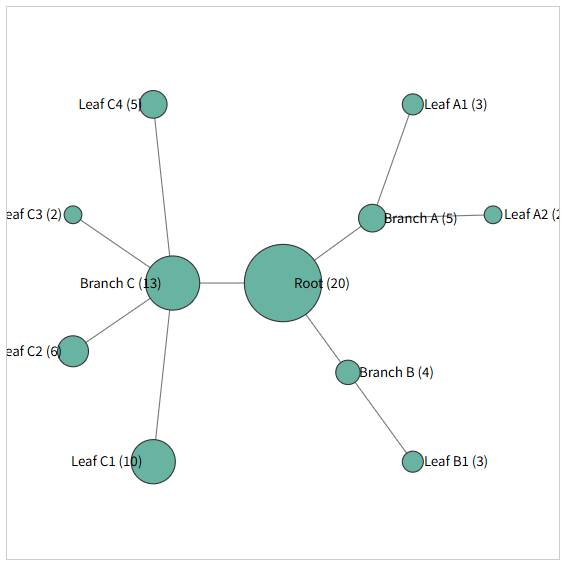
上の図もこちらの図も1つの値を葉ノードのサイズに使っているだけで、親から子ノードへの距離や子ノード間の距離は特に指定していない。相関性に関わる指標をデータとして入れればもう少し意味のある図になるだろうけど、いい感じのものが思いつかない。ブログであれば、各記事の本文中でどれだけ同じワードが出てくるかとかで相関性とかを数値化できるかもしれない。
サンプルコード
import { useState } from "react";
import * as d3 from "d3";

export default function RadialTree() {
  const [data, setData] = useState({
    name: "Root",
    value: 20,
    children: [
      {
        name: "Branch A",
        value: 5,
        children: [
          { name: "Leaf A1", value: 3 },
          { name: "Leaf A2", value: 2 }
        ]
      },
      {
        name: "Branch B",
        value: 4,
        children: [
          { name: "Leaf B1", value: 3 }
        ]
      },
      {
        name: "Branch C",
        value: 13,
        children: [
          { name: "Leaf C1", value: 10 },
          { name: "Leaf C2", value: 6 },
          { name: "Leaf C3", value: 2 },
          { name: "Leaf C4", value: 5 }
        ]
      }
    ]
  });

  const width = 500;
  const height = 500;
  const radius = 200; // ツリーのサイズ

  // ▼ D3: 階層構造と radial レイアウト計算
  const root = d3.hierarchy(data);
  const treeLayout = d3.tree().size([2 * Math.PI, radius]);
  treeLayout(root);

  // ▼ ノードサイズ(value で円の大きさを調整)
  const sizeScale = d3.scaleLinear().domain([0, 10]).range([5, 20]);

  // ▼ 極座標 → XY 変換
  const project = (angle, r) => {
    return [
      r * Math.cos(angle - Math.PI / 2),
      r * Math.sin(angle - Math.PI / 2)
    ];
  };

  return (
    <svg
      width={width}
      height={height}
      style={{ border: "1px solid #ccc" }}
    >
      <g transform={`translate(${width / 2}, ${height / 2})`}>

        {/* ▼ 枝(links) */}
        {root.links().map((link, i) => {
          const [sx, sy] = project(link.source.x, link.source.y);
          const [tx, ty] = project(link.target.x, link.target.y);

          return (
            <line
              key={i}
              x1={sx}
              y1={sy}
              x2={tx}
              y2={ty}
              stroke="#777"
            />
          );
        })}

        {/* ▼ ノード */}
        {root.descendants().map((node, i) => {
          const [x, y] = project(node.x, node.y);

          return (
            <g key={i} transform={`translate(${x},${y})`}>
              <circle
                r={sizeScale(node.data.value)}
                fill="#69b3a2"
                stroke="#333"
              />
              <text
                dy="0.35em"
                x={node.x < Math.PI ? 10 : -10}
                textAnchor={node.x < Math.PI ? "start" : "end"}
                fontSize={12}
              >
                {node.data.name} ({node.data.value})
              </text>
            </g>
          );
        })}
      </g>
    </svg>
  );
}