Javascript (D3+React_アニメーションサンプル)
■歯車のサンプル。
地図、ツリー、関数と見てきたけど、他に何かめぼしいものがないかD3の公式サイトを見ていたら、歯車を動かしているアニメーションがあった。それを簡素化したバージョンにして動かしてみた。
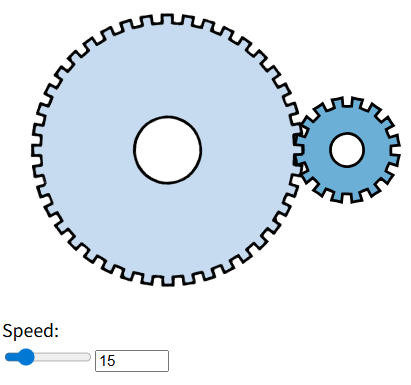
2つの歯車(左が歯数40、右が16)で2.5:1の比率。Speedのスライダーやテキストボックスで回転する速度を指定。
歯車のコードが下。teethが歯数、rootR, tipRで外径の溝部分を指定、holeRで内側の中抜きの部分を指定する。Math.PIはπ。かみ合わせの部分は溝や位置を調整してそれらしく見せている。
    const gear = ({ teeth, rootR, tipR, holeR }) => {
        const n = teeth;
        const da = Math.PI / n;
        let a = -Math.PI / 2;

        const p = ["M", rootR * Math.cos(a), ",", rootR * Math.sin(a)];

        for (let i = 0; i < n; i++) {
            p.push(
                "A", rootR, ",", rootR, " 0 0,0 ",
                rootR * Math.cos(a += da), ",", rootR * Math.sin(a),
                "L", tipR * Math.cos(a), ",", tipR * Math.sin(a),
                "A", tipR, ",", tipR, " 0 0,0 ",
                tipR * Math.cos(a += da), ",", tipR * Math.sin(a),
                "L", rootR * Math.cos(a), ",", rootR * Math.sin(a)
            );
        }
        p.push(
            "M0,", -holeR,
            "A", holeR, ",", holeR, " 0 0,0 0,", holeR,
            "A", holeR, ",", holeR, " 0 0,0 0,", -holeR,
            "Z"
        );

        return p.join("");
    };
アニメーション部分が下。rotateで回転させたものをrequestAnimationFrameで呼び出して再描画。このとき歯車の比率に応じて歯車ごとに角度を調整。
    const animate = (big, small) => {
        let t = 0;
        const svg = d3.select(svgRef.current);
        const gears = svg.selectAll(".gear");
        const ratio = -(big.teeth / small.teeth);

        const tick = () => {
            t += speedRef.current * 0.0005;

            gears.attr("transform", d => {
                const angle = (d === big) ? t :
                    (d === small ? t * ratio : 0);
                return `translate(${d.origin}) rotate(${angle * 180 / Math.PI})`;
            });

            requestAnimationFrame(tick);
        };
        requestAnimationFrame(tick);
    };
速い速度は映しきれなかったけど、動作サンプルが下。
このくらいのアニメーションであれば、D3を使わなくても実現できるのではないかと思う。公式サイトのExamplesで他にひかれるものもないので、D3については一端このくらいにしておこうと思う。